
 Home — Continuous Improvement Tools
Process Improvement Tools.
Standard Work.
Work Instructions.
Flow Chart templates.
Swim Lane Cross Functional Flowchart.
Value Stream Mapping.
Lean tools.
Time Study templates.
DMAIC tools.
Quality Improvement tools.
House of Quality QFD.
FMEA Risk Reduction.
Root Cause Analysis tools.
Problem Solving tools.
OEE.
Preventive Maintenance.
Skip to main content





Installation and Setup
Installation - Each User. Installation - Multi-user. Language Translations. Personalize Your Templates.Systems2win Training.
Quick Start Initial Training. New User Training. Training Matrix. Systems2win Leadership. Training Classes.Lean Training
Lean Training and Coaching. Lean Principles. Muda 8 Wastes. Goal - Lean Flow. Roadmap - Lean Journey. Value Stream Mapping. Standard Work. Hansei Lean Thinking. Lean Dictionary. Online Lean Training. Lean Leadership.Microsoft Office Training
Excel Training. Excel Drawings (without Visio). Excel Charts. Word Training. PDF Training. Document Storage and Naming.Support
Support.TWI Job Instruction
Job Breakdown Sheet template
The field-proven best way to train people — with fast, repeatable, consistent results
While self-study has highly variable learning success,
supervisor-led TWI training has close to 100% learning success 1
Job Breakdown Sheet
Excel template for TWI Job Instruction training preparation
Purposes
1) Instructor Notes
The Job Breakdown Sheet was originally designed to serve as Instructor Notes, used only by a Supervisor, to help the Supervisor prepare for and effectively deliver face-to-face training using the TWI Job Instruction method
2) Work Instructions
Because this format is so useful, it has also become popular to make these written instructions available directly to the worker
If your process is controlled by ISO 9001, or FDA, or any other controlling authority...
then it is forbidden to leave your Job Breakdown Instructor Notes with the worker unless the document conforms fully with all relevant document control requirements.
How to use your
Job Breakdown Sheet template
Choose which template to use
The Job Breakdown Sheet is available in two ways:
- As a stand-alone template (JobBreakdown.xlsx)
- As a sheet within your Standard Work template (StdWork.xlsx)
The stand-alone template is not available as a trial, so trial users will use the StdWork template.
Find and open your template
Find and open your Job Breakdown or Standard Work template
(JobBreakdown.xlsx or StdWork.xlsx )
in the same way that you find and open your other 150+ Systems2win templates.
If you don't yet own a license,
you can download your free trial now
Save your working document
following the usual document storage and naming conventions established by your leaders
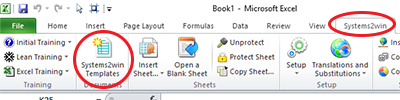
Open a Blank Sheet
When you're ready to start doing your own real work...
click the button to 'Open a Blank Sheet'
Even on the Standard Work template the 'Open a Blank Sheet' button will open a new Job Breakdown Sheet
(Usually, there will be only one 'StdWk' sheet per workbook, so this button is used to add Job Breakdown sheets)
Rename your new sheet.
Or... Insert Sheet
As an alternative to opening a stand-alone document (as instructed above), you also have the option to Insert Sheet into any other Excel workbook.
If English is not your preferred language
Switch to your language, just like every Systems2win Excel template.
How to use your
TWI Job Breakdown template
Write your Work Instructions
Pop-up Help
Remember, in any Systems2win template, you can click any row or column header to get pop-up help.
Key Points
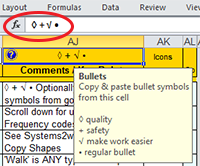
It is a good idea to use visual bullets to highlight Key Points:
+ Safety factors
◊ Quality considerations that make or break the success or failure of the job
√ Tricks of the trade that make the job easier to do
Learn more in the training for the TWI Pocket card (below)
How to copy bullet characters from the header field:
- Select the gold header field
at the top of the column for 'Comments / Key Points'
(Use Freeze Panes to keep your headers visible as you scroll)
- Copy the special characters from the Formula Bar
The Standard Work Instructions training video demonstrates how to copy shapes from the header field.
Shapes and Icons
You can use shapes and icons for safety, tools, equipment, materials, supplies, and anything else that is better communicated using symbols rather than words.
Where to find and copy shapes:
- In the 'Favorite Shapes' section of your template sheet
- Systems2win menu > Copy Shapes
has many more shapes
that are always available
to be quickly copied to ANY Excel workbook
and it has links to training for how to find and use Excel's large palette of standard shapes and it might have been personalized by your leaders, to include your own unique shapes
Excel Tips
On the 'Help' sheet of every Systems2win template you will find a section for 'Excel Tips Most Valuable for THIS Template'.
It would be a real good idea to refer that section of the 'Help' sheet now.
Train your users
The magic of the TWI Job Instruction method is not in the written job instructions.
The magic happens when you follow the instructions on your TWI Job Instructions Pocket Card.
Front of the TWI Job Instructions Pocket Card...
we have added additional tips in grey
How to Get Ready to Instruct
Have a timetable
using the Training and Skills Matrix
- How much skill do you expect which workers to have — by what dates?
Break down the job into concise Instructor Notes using the Job Breakdown Sheet
- List the major steps (what to do)
- The important steps that advance the work
- Small enough to chew and swallow in one bite
- Ideally with roughly similar amount of work in each step
- Start each major step with an action verb
- Pick out the key points (how to do it)
- + Safety factors are always a key point
- ◊ Quality considerations that make or break the success or failure of the job
- √ Tricks of the trade that make the job easier to do
- If more than 5 key points, consider breaking into separate major step
- Summarize the reasons for key points (why)
Have everything ready
- The right equipment, materials, supplies, and instruction aids
- Ensure that all process documentation is up to date to accurately reflect current best practices
- Ensure that the worker has permanent and easy access
to process documentation and training materialsHave the work place properly arranged
- Just as the worker will be expected to keep it
Back of the Job Instructions Pocket Card...
we have added additional tips in grey
How to Instruct
Step 1 — Prepare the worker
- Put the person at ease
- State the job
- Find out what the person already knows about the job (or similar type of work)
- Get the person interested in learning the job
- Place the person in the correct position (usually looking over your shoulder)
Step 2 — Present the operation
- Tell, show, and illustrate each major step — one at a time
- Demonstrate again — Stress each key point, and reasons for each key point
- Written process documentation should be introduced only AFTER demonstration. (Can be at the end of Step 2 or Step 3)
- Instruct clearly, completely, and patiently
- Teach no faster than the learner can master
Step 3 — Try out performance
- Have the learner do the job — with the instructor allowing the learner to work in silence — but correct any errors immediately (so that wrong habits never start) and perhaps again demonstrate anything that wasn't fully learned
- Have the learner do it again — this time explaining each important step
- Have the learner do it again — this time explaining every key point
- Have the learner do it again — this time explaining the reasons for every key point
- Make sure the person understands. Continue until you know they know.
Step 4 — Follow up
- Put the person on their own
- Make clear how much work is expected to be done over what period of time
- Now might be a good time for a brief refresher on the concepts of takt time and pitch pulse
- Ensure that the person knows where to find (easily accessible) process documentation.
- Designate to whom the person goes for help.
Almost always the same supervisor that did the original training.- Check back frequently to see how things are going.
- Encourage questions.
- Taper off extra coaching as it becomes evident that the person has mastered the new skill.
If the worker hasn't learned, the instructor hasn't taught
Get your own editable TWI Pocket Cards
 Included with the Systems2win Lean Training templates are templates that make it easy to quickly create your own TWI Pocket Cards.
You can easily personalize your company's TWI Pocket Cards, then print, cut out, laminate, and distribute to your supervisors as part of their TWI training.
Each card is perfectly sized to be the exact same size as a credit card.
In addition to the Job Instructions Pocket Card, there are also pocket cards for Job Methods, Job Relations, and a pocket card for second line supervisors and Change Agents.
As you edit your own personalized Pocket Cards and Instructor training materials, just be sure to comply with Charles Allen's Four Rules of Training:
- Prepare — Connect the learning experience with the learner's own experience
- Present — Present new information in small chunks
- Apply — Do it; and show that the learner can do it
- Test — Repeat without help from the instructor
Useful tools for worker training
Job Instructions Pocket Card — To quickly remind supervisors how to follow the TWI training method
Job Breakdown — Instructor Notes usually used only by the supervisor for training
Job Instructions — Detailed Visual Work Instructions always available for worker reference
Standard Operating Procedure — Another popular format for detailed worker training
Standard Work Instructions — Short instructions usually taped in front of the worker for constant reference
Layout Diagram — Also often taped alongside Standard Work Instructions
Cross Functional Flowchart — For processes that get handed off
When you own your Systems2win templates, you own ALL of these tools,
so that you have the right tool to train your workers for ANY type of process
Use TWI to train your people to use their Systems2win tools
Your supervisors can use TWI Job Instruction methods (above) to train your people to use their Systems2win tools quickly, inexpensively, and thoroughly.
Here are a few things that Systems2win does to make TWI easier for your supervisors to teach:
- Quick Start training for what every user should know before using ANY Systems2win template.
- The Help worksheet found in every Systems2win template has sections for:
- Purpose (state the job)
- Instructions for How to Use This Template
(complete written instructions, with major steps and key points highlighted)
- Your supervisors can use the Training Matrix to define who needs to be trained to use which tools.
- Free online training (above) for training your own in-house Instructors on how to train your own people using the success-proven TWI training methods.
- Systems2win offers affordable web conference training — with a live instructor.
Split long topics into multiple sessions
Most Systems2win tools are so drop-dead simple to use that the only training that will be required will be the Quick Start training and the help found on the Help worksheet.
Other templates might justify one short TWI session with your in-house Instructor.
A few of the templates are complex enough for your in-house Instructor to consider splitting into multiple sessions. For example, if a person or team has never even used a Value Stream Map before, then it might make sense to have a couple of sessions to introduce the foundational symbols and concepts. And then perhaps have a training session for each phase of value stream mapping — rather than trying to cover the entire process in one overwhelming session.
The templates that cover the most complex concepts are:
- Value Stream Mapping
- Swim Lane Cross Functional Flowchart
(especially if using the lean metrics — not just drawing)
- Standard Work (which is also used for SMED)
- Visual Work Job Instructions
- A3 Report
- Gantt Chart Project Plan
(especially if using Work Calendar Adjustment Factors)
- QFD House of Quality
(especially if using all 4 phases of QFD)
- Root Cause Analysis Fishbone Diagram
importing data from an existing FMEA
Can we wait to start
this project?
I haven't finished
making my tools.
Although each one of the individual Kaizen tools are pretty self-explanatory, the way they all fit together within the kaizen process might deserve Instructor attention.
And if you are at all involved in Lean Office or Lean Healthcare, then extra training is almost always required in order to get people through the fundamental concepts of what lean is really all about, and how most of those concepts most certainly CAN apply to their "unique" challenges.
Suggested Reading
Learn more about TWI Training Within Industry
Systems2win lean training tools
1 Success rate is close to 100% when done correctly. Success rate can be as spotty as anything else if TWI training and/or execution is sloppy or incomplete.
New User Training
Your Systems2win templates come with free New User Training
to quickly learn features that are common to all 150+ templates

Training and Coaching
Consider Training and Coaching to support your teams to succeed
Training to get you started.
Tools you won't outgrow.
Schedule a Conference
Schedule a conference
to discuss your challenges
with an experienced lean advisor