
 Home — Continuous Improvement Tools
Process Improvement Tools.
Standard Work.
Work Instructions.
Flow Chart templates.
Swim Lane Cross Functional Flowchart.
Value Stream Mapping.
Lean tools.
Yamazumi Chart template.
Time Study templates.
DMAIC tools.
Quality Improvement tools.
House of Quality QFD.
FMEA Risk Reduction.
Root Cause Analysis tools.
Problem Solving tools.
OEE.
Preventive Maintenance.
Skip to main content
A3 Excel template and Word template




A3 Problem Solving





















Download your






Installation and Setup
Installation - Each User. Installation - Multi-user. Language Translations. Personalize Your Templates.Systems2win Training.
Quick Start Initial Training. New User Training. Training Matrix. Systems2win Leadership. Training Classes.Lean Training
Lean Training and Coaching. Lean Principles. Muda 8 Wastes. Goal - Lean Flow. Roadmap - Lean Journey. Value Stream Mapping. Standard Work. Hansei Lean Thinking. Lean Dictionary. Online Lean Training. Lean Leadership.Microsoft Office Training
Excel Training. Excel Drawings (without Visio). Excel Charts. Word Training. PDF Training. Document Storage and Naming.Support
Support.Lean A3 Template
A3 Excel template and Word template
A3 Report Template — A3 Problem Solving Template
Types of A3 Reports
The same A3 template can be used in many diverse ways:
Why re-invent?
A3 Problem Solving
The most common way to use your A3 template
is for A3 Problem Solving
A3 Management
No matter which lean management systems you are using,
your A3 template is an effective way to charter your team, plan your project, and provide progress reports
Types of A3s
See A3 examples of the many ways that you can use your A3 Report template
Free A3 template
Download your free A3 template
Not just a trial; a gift
that you can use
for the rest of your career
A3 Report Template
An A3 Report is a simple storyboard
that tells the whole story of an improvement event on one large sheet of paper.
A good A3 should tell a story,
bringing a problem to life and pointing the way to a better future.
Video: How to use your
Excel A3 template
The left side defines the problem — the right side proposes solutions
Sample A3 example. Download this free A3 Word template AND the free Excel A3 template!
Your A3 template and this online training make your problem solving process more consistent, standardized, legible, and shareable.
- Define and solve problems
- Teach managers how to better coach and lead
- Empower people to implement their great ideas
- Instill a way of 'A3 thinking'
that causes entire teams of people to sharply focus their minds on the foundational Lean ways of seeing process flows and wastes — constantly redirecting their attention back to foundational Lean teachings:
Why A3 Problem Solving?
Use A3 Problem Solving to systematically...
- Lean Objectives and Ideals
- The Seven Deadly Types of Waste
- Hansei questions to stimulate lean thinking
A3 Problem Solving
A3 Process for A3 Thinking
Detailed problem solving steps for how to use the A3 methodology
A3 Methodology for 8-Step Problem Solving
Before you start —
Become familiar with your A3 template
On the left side
Obtain Phase 1 Approval to begin your A3 project
Obtain Phase 2 Approvals for Problem Analysis
On the right side of your A3 Report
Obtain Phase 3 Approvals for Countermeasures
Choose countermeasures to implement
Obtain Phase 4 Approval to begin Implementation
Search
Use 'CTRL+F'
to find keywords
Related Training
Become familiar with
Your Lean A3 Template
Find and open your A3 Report template
Find and open your A3 Report template
Excel version: A3Excel.xlsx
Word version: A3Report.docx
in the same way that you find and open your other 150+ Systems2win templates.
Yes, you open ALL of your Systems2win templates through Excel... even Word and PowerPoint templates.
If you don't yet own a license, you can download your free A3 templates now.
You can use either (or both)...
Excel A3 Template (A3Excel.xlsx)
Word A3 Template (A3Report.docx)
Both templates give unmatched flexibility for wildly diverse formats.
(and it is rare for any two A3 Reports to look alike)
You can use everything you know about familiar Microsoft Word and Excel
to change fonts, colors, tables, borders, margins...
And for the few things that you might not yet know...
you can quickly review our (short) Microsoft Word training
and (thorough) Microsoft Excel training
Video: How to use your
Word A3 template
Save your working document
following the usual document storage and naming conventions established by your leaders
Learn how to edit your Excel A3 template
View it properly
You can use either View > Normal
or View > Page Break Preview
Learn more about Page Break Preview
Pop-up Help
Like every Systems2win Excel template, you can click any row or column header to get pop-up help.
Video: How to use your
Excel A3 template
Use text boxes
Don't use word wrap
(which changes row height for both sides of your A3 Report)
Instead, use text boxes
Large fonts also change row height on both sides of your A3 Report
so also consider using a text box for large fonts
Learn how to move cells
Learn how to move cells to easily:
- move section headers
- reallocate available space
- rearrange
Set up your printer
Your A3 Report can be printed on many paper sizes...
- 11x17 or A3 (11.7x16.5)
- Two side-by-side pages 8.5x11 or A4 (8.3x11.7)
- Plotter
Learn how to correctly set up your printer.
Set up your Approval system
Above the print area, there is a row for Approvals.
As each approval phase is completed, use the dropdown list (circled in the image)
to indicate which approval level has been completed for each of the 4 Approval Stages for A3 Problem Solving:
- Not Started Yet
- Authorization to Begin This Project
- Problem Analysis
- Countermeasures
- Authorization to Implement
When Periodic Reviews confirm that this problem solving project has been successfully completed, then select:
5. Completed
If this project is terminated without ever reaching its objectives, then document and socialize lessons learned, and select:
X. Lessons Learned
You can also use the button to 'Insert Sheet' to insert an Approval form to allow users of your electronic A3 Report to instantly drill down to:
- Full list of all decision-makers and stakeholders
- Clear description of whose approvals are needed for which phases
- Status of which approvals are completed or still pending
Optional — Insert Sheets
If using the Excel template,
you can use the button to Insert Sheet
to (optionally) add useful sheets to your A3 workbook.
- Approval form
- Is Is Not Problem Analysis
- Root Cause Analysis
- Layout Diagram, flow chart, Pareto chart, and/or many other useful charts
- Action List, Too List, Value Stream Plan, Bowling Chart, Gantt Milestone Chart, Process Analysis, and/or Results Audit... to plan and track progress
This feature, to Insert Sheets, is available only in Excel templates, not Word templates,
and is the reason that most users choose to use the Excel A3 template instead of the Word A3 template.
Learn how to edit your Word A3 template
Some people are more familiar with Microsoft Word, rather than Excel, and this is the most powerful and well-documented Word A3 template that you will ever find
Find and Open your Word template through Excel
ALL Systems2win templates are opened through the Systems2win menu in Excel.
Even non-Excel templates, such as Word templates, PowerPoint, or pdf.
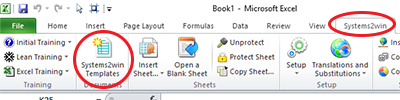
Excel > Systems2win tab > Systems2win Templates
Tip: If you get an error when attempting to open a Word template through the Systems2win menu in Excel,
try opening Word first. Then (with Word already open in another window), try again.
View it properly
In the ribbon bar at the top of Microsoft Word,
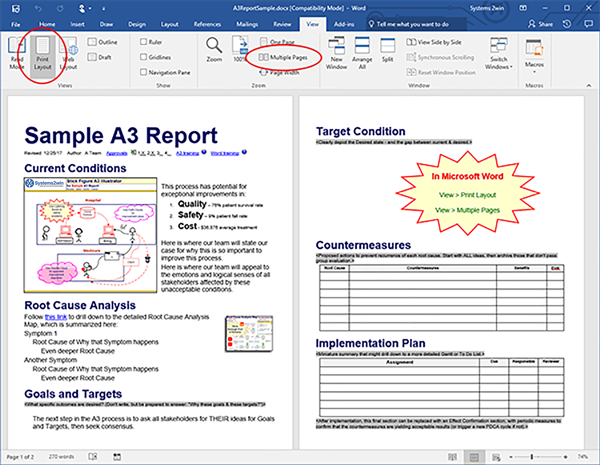
select the View tab, and then select Print Layout, and Multiple Pages.
Your A3 Report should look something like this on your screen.
How to use Form Fields in Microsoft Word
Wherever you see any block of instructional text,
simply select that instructional text,
and replace it with your content.
Learn more
about Microsoft Word Form Fields
(Estimated learning time: About 1 minute)
Instructional text (in gray)
disappears when you replace it with your words
Set up your printer
Learn how to correctly set up your printer.
Set up your Approval system
Your A3 Word template has a simple visual system.
As each approval phase is completed,
simply enter an X next to the phase number
for each of the
4 Approval Stages for A3 Problem Solving:
- Authorization to Begin This Project
- Problem Analysis
- Countermeasures
- Authorization to Implement
Near the top of your A3 Report Word template,
use an 'X' to mark each completed Approval Phase
To enable users of your electronic A3 Report to instantly drill down to your detailed Approval form...
Activate the Excel link icon:
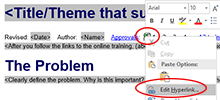
Right-click the Excel link icon, and edit the hyperlink,
so that it links to your Approval form
(which is stored in the same folder with your A3 Report,
to avoid any chance of a broken hyperlink)
You are now ready to use your
A3 template for Lean Problem Solving
On the Left Side of your A3 Report...
Define the Problem
Write your Title
Replace the Title at the top of the page with a succinct summary of the theme or challenge that is the purpose of this A3 Report.
Replace the Revised Date
A3 Reports are intended to change very rapidly. Keep your Revised Date current.
Start your archive system
Keep archives of the rapidly changing versions of your A3 Report — sorted by Revised Date.
See training for how to maintain both paper and electronic archives of date-sequenced versions of your ever-evolving A3 Report.
Identify the Author, Mentor, and Team
Because there is very little space available,
usually only the Author and Mentor names are on the A3 document.
Users of your electronic A3 Report can instantly drill down to the Approval form
where each team member is identified, along with the mentor, and all other decision makers and stakeholders.
Online training for the roles of Author and Mentor.
A3 Problem Solving Step 1
Clarify the Problem
aka Background and Importance
Clearly define the problem.
Why is this important? (from customer and stakeholder perspectives)
Helpful Tools for this phase of the A3 process


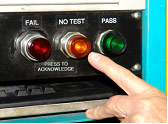
For detailed Problem Analysis,
you might use your Insert Sheet button
to insert a sheet for Is Is Not Analysis.
Helpful Tips for this phase of the A3 process
How does an A3 get initiated?
Your manager might assign a problem for you or your team to solve
using the usual tools and methods to launch any team.
It is considered even better when an A3 is proposed by someone doing the actual work.
Some managers keep a special 'A3 in basket' in a clearly marked accessible place, specifically to encourage ANYONE to propose their idea for what might be improved.
Don't get ahead of everyone
The stakeholders and decision makers will want to have a lot to say about 'Desired Target Conditions' and 'Root Cause Analysis', so don't put too much in those sections until you obtain approval to properly begin your A3 project.
Exceptions:
- If some stakeholders offered up some potential root causes, then include them (along with the names of the idea generators) — to demonstrate that you're actively listening.
- If your mentor or decision-makers ask you to estimate the possible scope of this project, then you might need to provide a (very) rough first draft Implementation guess.
Your Proposal A3 (or A4)
(See Types of A3 Reports)
should not have anything about 'Countermeasures',
so the right side of an 11x17 or A3 sheet should be completely blank,
so you might start your Proposal as an A4 Report (or 8.5x11 paper),
or your mentor might say that it's okay to use 11x17 paper, and to go ahead and use all of that extra space in your early drafts - to more thoroughly define your problem and root causes - and then tidy up and condense the left side of the report when you become ready to start working on the right side.
A3 Problem Solving Step 2
Describe Current Conditions
aka Problem Breakdown
Go to the gemba
Go to the gemba to observe for yourself what is actually happening.
Perhaps use your A3 Gemba Interview template.
Perhaps use one your Process Observation templates and techniques.
Perhaps just observe and ask questions.
Describe Current Conditions
Then use graphs, numbers, and facts
to clearly depict the Current Condition
in a way that invites analytic questions.
Helpful Tools to illustrate Current Conditions




An effective A3 Report
has emotionally-compelling pictures, charts, graphs, and illustrations...
not just dry, boring words.
See Advanced Tips:
Get approval to start the A3 process
Approval form
Use your Approval Form template (Approvals.xlsx)
to identify decision makers and stakeholders
and to obtain the first column of approvals for 'Authorization to Begin This Project'
Your Approval form provides a systematic way
to spread 'kanban democracy' throughout your organization — making pull-based authority transparent and systematic.
If (and only if) the person with authority agrees to authorize the problem solving project, then the A3 author is given the green light to move to the next steps.
Perhaps the single greatest benefit of using the A3 Method is the way it authorizes what Toyota calls 'kanban democracy' or 'pull-based-authority'
where authority is earned by anyone with an idea that is good enough to survive the A3 gauntlet.
"Pull-based authority may be the most important JIT element of the entire Toyota system."
~ John Shook, author of 'Managing to Learn'
Tips for Adjusting Project Scope
If the scope of a proposed A3 project is too narrow or simple,
then that's what your 'One Good Idea' template is for: (GoodIdea.xlsx)
It provides a one-page 'before and after' storyboard to visually tell the story of how a good idea quickly solved an important problem — in a format that can be easily shared, socialized, and archived.
If there is already consensus to 'just do it', then don't waste everyone's time with the more thorough A3 problem solving process. Just do it.
If the scope of the proposed A3 project is too wide or complex,
then perhaps consider splitting into smaller projects, and/or using some other problem solving tools and methods.
Go back to the Gemba
The first thing to do after you get approval to officially start a problem solving assignment is to go back to the gemba to more thoroughly describe Current Conditions.
You might schedule a meeting - inviting representatives of all stakeholders -
or you might just carry your clipboard around to talk with people individually -
or a combination of both.
Either way - you've got to 'go to the gemba' (the actual place where the work is performed)
to observe the process and interview the people doing the actual work
to really understand
1. the true nature of the presenting problem
What are the 'real pains' being felt? by whom?
Your goal is to gather and make sense of meaningful facts -
not just meaningless data, or agenda-riddled anecdotes.
2. the root causes of the presenting problem
In the real world, it is never too early (or late) to ask people their opinions about possible root causes.
The 8-Step Problem Solving Method is flexible enough to start Step 4 while completing Step 2.
Always bring a printed copy of your (ever-changing) A3 Report on a clipboard
Hand write what you observe and discuss at the gemba.
Then later, back in your office...
transcribe (and clarify) your hand written notes onto your (electronic) master A3 Storyboard.
Repeat
Print. Observe & discuss. Clean up. Repeat.
See training for how to set up your printer
Helpful Tips for this phase of the A3 process
Expect a lot of hand-drawing and erasing
Your A3 template is great for clarifying your thinking, and creating legible, shareable, professional-looking deliverables...
and yet it's going to go through a LOT of revisions - as you print your latest thoughts, and then carry it to the gemba, where you will handwrite people's inputs and ideas - and then come back and revise your A3 (and more importantly, your thinking) - again and again and again.
A3 Thinking
If you haven't erased and re-drawn just about everything but your name, then you have probably been avoiding someone that you fear might 'be a problem'. Go talk to them. Or more correctly... go listen to them. And learn a first-hand lesson about a non-intuitive benefit of the A3 process - earning true and lasting mutual respect through conflict.
Mentoring
Check in with your mentor often,
showing the progress of your latest A3, and gaining their valuable guidance.
If you are lucky enough to have a wise mentor,
then he or she will ask questions that guide you -
patiently swallowing the natural urge to just blurt opinions,
or to do your work for you.
If you are not lucky enough to have such a rare mentor,
then buy and read John Shook's book 'Managing to Learn', (see suggested reading), and then ask yourself,
"What might Ken Sanderson advise me to do in this situation?"
Or, if you have a budget, perhaps consider interviewing an on-site coach.
If you are the mentor
Every sensei needs their own sensei.
If there is no experienced sensei above you in your organization, then that means that you must be high enough on the corporate ladder to justify hiring an experienced outside consultant.
(or at least some fill-in-the-blanks tools with self-paced training)
Helpful Tips for this phase of the A3 process
The Change Agent is always the most valuable person in any organization.
Why not become one?
And what better way to demonstrate lean thinking than by using lean tools and methods yourself?
Teach and coach your people to use both:
- The 8-Step Problem Solving Method
- The A3 Problem Solving Tool
As hard as it is...
keep in mind that even more important than 'getting this one task done'....
Your primary goal is to teach and encourage A3 thinking
teaching and demonstrating skills for a repeatable, transparent, facts-and-consensus-building problem solving method that is accepted and practiced by everyone throughout your enterprise.
So bite your instinct to 'just tell them what to do' - and instead - ask questions.
When an A3 Champion succeeds in dramatically improving a process, don't squelch their newfound free time by piling on mundane responsibilities.
Instead reward them with an even more challenging problem solving assignment.
You need to produce good people before you can produce good things.
A3 Problem Solving Step 3
Set Desired Target Conditions
aka Desired Goals and Targets
Pause, Reflect, Think
What specific outcomes are desired?
Why these goals & these targets?
Now is a really good time to visit (and revisit)
the Hansei questions to stimulate Lean Thinking.
Write
Format: Action verb + object + from current to target by date.
Example: Reduce cost from $5 to $3 by Feb. 1
Use this section of the A3 Report to clearly show
the (emotionally unacceptable) gap between current conditions
and the desired conditions that are clearly closer to Lean Ideals.
Make your Target State visual and compelling
It is always best to use illustrations, not just words,
to activate the intuitive, creative, problem solving side of the brain.
Potential tools for this phase
Any of the same tools, charts, graphs, maps, or illustrations recommended in the section for describing the 'Current Conditions'.
Perhaps include an image spotlighting
a section of a linked value stream map, functional flowchart, or other large illustration,
and also provide a link to allow the user to drill down to the full document.
In your charts, maps, and illustrations...
Use bursts and clouds to highlight problems and ideas.
See Advanced Tips for
A3 Problem Solving Step 4
Root Cause Analysis
Go back to the gemba
Keep asking 'why?'
What are the root causes for problems?
Keep asking 'why' until you arrive at the (often not-immediately-obvious) root problems that underlie your (more obvious) problem.
The Toyota Production System was built on the scientific approach of asking 'why'?
~ Taiichi Ohno, past CEO Toyota
Document root causes
Then succinctly summarize Root Causes in this section of your A3 Report.
If your identification of root causes is even slightly incorrect, then your countermeasures will be even more incorrect.
Helpful Tools for this phase of the A3 process
Perhaps link to the Root Cause Fishbone Diagram
or other Root Cause Analysis Tools that your team used .
Additional helpful tools include your Gemba Interview form, Pareto, 5 whys, Root Cause Map, Cause & Effect Matrix, Scatter Plot, Histogram...
See Advanced Tips for
Obtain Phase 2 Approvals for Problem Analysis
Use your approval form to obtain approvals from all identified decision makers and stakeholders
to ensure that everyone agrees that you have thoroughly clarified the problem and its root causes.
The Right Side of your A3 Report is for
Countermeasures
Don't jump to solutions
Perhaps the single most important reason for the existence of A3 Problem Solving is to avoid jumping to proposed solutions before thoroughly defining root problems.
Do not touch a single pencil mark in the Countermeasures section of your A3 Report
until you have obtained all Phase 2 approvals for Problem Analysis.
A3 Problem Solving Step 5
Conceive Countermeasures
Again... go to the gemba
Ask everyone for their ideas for proposed actions to prevent recurrence of each root cause.
Let them watch you hand write their ideas on a printed copy of your (ever-changing) A3 Report.
Due to limited space, not every idea will remain on the final version of your A3, but
your goal at this stage is to honestly listen to every stakeholder's ideas
and to ensure that they feel that their ideas have been honestly heard
Your goals in this phase are to gain...
- Widespread understanding of the problem -
and agreement on the importance of reaching the desired conditions - Credibility - that you truly understand all aspects of the presenting problem, and the underlying root causes
- Credibility - that you have identified, expanded upon, and fairly represented all proposed countermeasures
- General agreement about which countermeasures naturally float to the top
- Shared ownership
Include ALL suggestions
Make sure that everyone's ideas are included in the 'Countermeasures' section.
Make sure that countermeasures are designed to prevent recurrence of root causes.
Perhaps go back and improve the desired 'Target Conditions' as new ideas arise.
Perhaps use your 'Issues and Ideas' template (Issues.xlsx)
to document concerns and challenges with some proposed countermeasures.
Helpful Tips for this phase of A3 Problem Solving
Temporarily delete the final 3 sections of your A3 Report
You can't start the 'Implementation Plan' section until countermeasures are agreed upon, so temporarily delete the (not-yet-needed) final 3 sections,
and use the extra space to identify all countermeasures
(even those that are currently not popular)
and then save archives of your interim A3s before finalizing the one that contains only those countermeasures that were actually selected.
(And then you can copy and paste those final 3 sections from your master template when needed)
Don't worry about Countermeasures taking up too much space
Trust the process - that only the best ideas will survive into the next draft -
but include them all in this draft.
Tip: If your A3 contains only your one favorite solution and a couple of unacceptable alternatives, then you've really missed the point of all of this, haven't you?
Helpful Tools for this phase of the A3 process



Note: If you don't need the table in the A3 Word template, delete it.
This is your A3 Storyboard!

Obtain Phase 3 Approvals for Countermeasures
Before moving on to the 'Implementation Plan' section of your A3 Report,
you must first obtain all required approvals in the 'Countermeasures' column of your Approvals form.
Your mentor should be the last to sign off — after all other stakeholders have agreed that alternative measures have been sufficiently identified and improved upon.
A3 Problem Solving hidden step
Choose Countermeasures
Toyota 8-Step Problem Solving does not include a step to 'Choose Countermeasures',
but we believe that this is important enough to deserve extra attention
Once everyone's ideas have been heard and expanded upon...
Take time to pause, ponder, reflect, and think
It would be such a waste to go through all of this effort of the A3 Problem Solving Method
only to fumble the ball on the 1 yard line
because you skipped...
the single most important step
Take time to pause, ponder, think, and reflect
Take time for Hansei
And then, once you and your team have taken time to reflect...
Choose countermeasures to implement
Edit this section of the A3 Report to include only
those proposed countermeasures that are proposed to actually implement.
Helpful Tips for this phase of the A3 Process
Being the document author does not give you authority to make all the decisions.
It gives you the responsibility for getting all decisions made.
The better you did the earlier phases - the easier this phase will be.
In fact, if you do a great job in the earlier phases, it is not uncommon for consensus to just happen spontaneously - thereby making final approval a rubber-stamp formality.
Switch hats — from investigator to advocate
Now, (and only now), after everyone agrees that you truly understand the problem and have truly listened to all ideas and opinions...
it is now time to switch hats - from investigator to advocate - to bring the group to:
- Consensus to agree to support those countermeasures that you believe are the best way forward...
even if that means persuading some people to accept their second or third preferred solution...
even if that means persuading some people to accept a solution that causes them more personal pain and suffering than their preferred solution.
- Commitment to be fully supportive to do their part to reach the desired state
If you are unable to incorporate any person's concerns,
then you are expected to return to that person to explain and discuss why those concerns were not addressed – to show that their concerns were taken seriously – and to seek support and alignment – even if sometimes requesting individual sacrifice for the greater good.
It is sometimes helpful to review with that person the spirit and meaning of the concept of consensus.
If some good ideas might be considered for possible future implementation,
add them to your 'Potential Future Improvements' list (PotentialFuture.xlsx)
If consensus doesn't come easily
perhaps use one of your decision making tools.
Obtain Phase 4 Approval to begin Implementation
Before beginning to actually implement your 'Implementation Plan', primary decision-makers and the mentor must agree to authorize implementation of the proposed selected countermeasures.
A3 Problem Solving Step 6
Implement Countermeasures
If you temporarily deleted the 'Implementation Plan' section to make room for countermeasures
then after you have removed the rejected countermeasures,
there should now be plenty of space available
to copy and paste that section from your master template.
The table in the Word A3 template is optional.
You can delete it or change it. You are the author.
If you want a table in your Excel template,
it is wiser to make your table in a separate sheet,
and then copy a screen shot of the table
(as a scalable image).
By the time you get to this implementation planning stage, there will be very little space available,
so you will almost always include just a short summary plan on the A3,
perhaps using a thumbnail image and/or a hyperlink for the user to drill down to your detailed plan.
Helpful Tools for this phase of the A3 process
Any of your Project Management Tools, including...
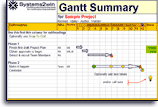


A3 Problem Solving Step 7
Monitor and Evaluate Results
aka Effect Confirmation
Perform Periodic Reviews
As soon as Implementation gets started,
schedule the date for the first Periodic Review.
During and after implementation...
use the 'Results' section of your A3 Report
and the 'Periodic Review' column of your Approval form to confirm that countermeasures are yielding acceptable results
(measuring both: outputs, and the process itself)
If results are not acceptable...
then that should trigger a new PDCA cycle
Keep scheduling Periodic Reviews until the desired results prove to be sustainable.
Helpful Tools for this phase of the A3 process
In your Approval form, you can make additional copies of the 'Periodic Review' column as many times as it takes until your 'Desired Target Conditions' become observable mensurable realities.
And you can use any of your templates to measure results,
many of which have similar ability to copy columns for as many 'Periodic Reviews' as you need.
Expect and allow your A3 to evolve and change
"Plans are worthless. Planning is everything."
~ Dwight Eisenhower
A3 Problem Solving Step 8
Standardize and Share Success
aka Follow up
After success is achieved,
summarize how it was standardized, socialized, and expanded to similar processes.
Standardize
Revise all documentation, and retrain everyone to do things the new (better) way.
Helpful tools: Standard Work,Work Instructions, TWI Job Breakdown
Retrain leaders, and revise leadership systems.
Helpful tools: Leader Standard Work, Lean Management Systems
What's so wrong with backsliding into old habits?
Socialize
Tell your story. The problem your team faced, the way you analyzed it, the root causes that you identified, the countermeasures that you considered, why you chose the ones you chose, how your implementation plan started, and how you repeatedly revised it based on what you actually observed.
Helpful tools and methods: Team Board, Daily Stand Up Meeting, Lunch and Learn...
Expand
What other teams and processes might be able to do something similar?
Helpful tools: Lessons Learned (LessonsLearned.docx),
Potential Future Improvements (PotentialFuture.xlsx), Event Schedule (eventSchedule.xlsx)
Reflect
Perhaps schedule a Hansei Review meeting for group reflection,
but even more importantly —
pause to take some quiet time on your own
to reflect on what has worked well and what still needs attention
for both the problem at hand and your people skills and systems for continuous improvement.
Later in his career, Edward Deming tried to change PDCA to PDSA
because he felt that the word 'study' captured what you should be doing in this phase better than the word 'check'.
Reflection (hansei) is unquestionably the most important component of the entire A3 Process,
and yet it is the most likely to be skipped.
Learning exercise:
Pause right now for 1 long minute
to truly and deeply reflect on what Henry Ford meant when he said,
"Thinking is the hardest work of all. That's why so few people do it."
"Whether contained in an actual A3 report or not, you can begin to think of conversations that contain this thinking as centering around a kind of 'virtual A3', where discussants frame their thinking carefully for their listeners, share information to gain mutual understanding with objectivity and respect, and exchange and obtain consensus through vigorous debate as plans are then laid and implementation undertaken. Thorough reflection ensures that the loop is closed, lessons learned, and the process started anew."
~ John Shook, author of 'Managing to Learn'
Benefits of A3 Thinking
- Provide a single, easy-to-use approach for solving ANY type of problem
When everyone knows what someone means when they say "Let's do an A3", it frees people up to focus on the roots of problems — without needing to reinvent new ways of working together
- Encourage people to identify problems
And bring attention to them,
in contrast to hiding problems, or pretending that there aren't any. - Stimulate group dialog and creative problem-solving
Building consensus based on objective, indisputable observed facts,
in contrast to one person trying to 'sell' their pet ideas and subjective opinions. - Break the bad habit of jumping to solutions before defining root causes
and the bad habit of being the heroic fire fighter, instead of preventing fires in the first place.
- Encourage managers to manage the means of production
by truly understanding the dirty details, in contrast to the just-show-me-results Management By Objective approach that is popular with so many MBA schools.
-
Empower the people closest to the work
to share responsibility for improving their work,
in contrast with top-down command and control
that discourages workers from thinking and caring. - Instill an organizational culture of 'learning to learn'
Instilling more effective ways of thinking, working, and learning together,
in contrast with just doing what you're told. - Groom new leaders in a scientifically repeatable way
that actually demonstrate how to lead —
and how to mentor their own people to also become new leaders - Provide a systematic logical thinking process
teaching people to see, understand and synthesize cause and effect relationships
in visual, succinct ways that anyone can understand at a glance
Advanced Tips
for how to use your A3 Report Template
Use your A3 template with any printer
Your A3 Report can be printed on many paper sizes...
- 11x17 or A3 (11.7x16.5)
- Two side-by-side pages 8.5x11 or A4 (8.3x11.7)
- Plotter
This Video demonstrates
how to set up your printer
How to set up your printer — in Excel
For 2 side-by-side pages (8.5x11 or A4)...
Do nothing. This is the default, and you are ready to go.
For 11x17 or A3 paper size...
Page Layout > Size > Tabloid or A3,
and
Orientation > Landscape
Tip: the list will contain only choices of paper sizes supported by your currently selected printer
To select a different printer (or plotter)...
File > Print > then use the dropdown list to select your desired printer (or PDF writer)
Your Excel A3 template is carefully formatted to correctly print on any of the common paper sizes (above).
Do not change column widths!
If you change column widths, then you're on your own to make everything fit correctly.
Use text boxes instead of word wrap!
If you use word wrap, then:
- Row height gets increased on both sides of your A3 Report
- You might need to delete other rows
to keep everything on one A3 sheet (or 2 side-by-side A4 sheets)
Instead of word wrap, use a text box.
Your Systems2win A3 template gives you both a white and clear text box that you can copy and use anywhere on your A3 document —
thereby leaving all row heights unaltered.
Use Page Break Preview
Use Page Break Preview to ensure that everything fits as expected.
How to set up your printer — in Word
The standard template starts with two 8.5 x 11 pages
(which can be easily changed to international paper size A4)
- which is ideal for an A3 Report, because the right and left halves of the report serve distinctly different functions
- and the two pages can be easily viewed and edited side-by-side using View > Print Layout > Multiple Pages
If all you have is a small printer...
- Simply tape the 2 printed pages together
- You can still create a PDF in 11x17 or A3 paper size
Simply select your PDF Writer as your printer
when you follow the instructions below
For a printer that is capable of printing 11x17 or A3 paper...
File > Print > Printer:
select a printer or PDF writer
capable of printing 11x17 or A3 paper
File > Print > Page Setup, or...
-
Paper tab
(see images)- Paper size: A3 or Tabloid 11x17
Tip: your printer must support this paper size. - Apply to: Whole document
- Paper size: A3 or Tabloid 11x17
-
Margins tab
(see images)- Orientation: Landscape
- Multiple pages: 2 pages per sheet
Perhaps start with an A4 Report
When starting with a Team Charter or a Proposal A3,
(see Types of A3 Reports)
there shouldn't be anything on the right side of an 11x17 sheet of paper,
so you might want to start with an A4 Report (using only the left side).
Your Systems2win A3 template makes it very easy to print just the left side.
Illustrations
An A3 Report shouldn't consist of just words.
It should have visual images.
Potential illustrations
Any of your 150+ process improvement templates might be used to illustrate your problem solving storyboard.
Insert Picture
You can easily insert a picture using Insert > Pictures
Tip: See training for how to reduce image file sizes so that the Mb size of your Excel file doesn't become unmanageable.
Screen shots
Learn several easy ways to copy screen shots to your A3 Storyboard.
These could be screen shots of:
- An entire chart, graph, report, or illustration
- A 'highlight zoom' of just a segment
Scalable images
The A3 Author can drag the corner of an image to make it smaller.
Users of your electronic A3 Report can temporarily drag the corner of that image to make it larger, and then use the Undo command (CTRL+Z) to revert the image back to its smaller size.
Hyperlinks to related documents
Any image might also be accompanied with a hyperlink
to enable users of your electronic A3 Report to instantly drill down to related documents, such as:
- The Approval Form
to track which stakeholder approvals are needed and obtained for each phase of the A3 problem solving process
- Is Is Not Analysis
for detailed Problem Analysis
- Root Cause Analysis tools
that are greatly summarized in your small 1-page sheet
- Current and Target Conditions
with drill-downs to charts, graphs, maps, and illustrations
- Gantt Chart, Action Plan, or To Do List
that was greatly summarized or thumbnailed
in the 'Implementation Plan' section of your A3 Report
In addition to thumbnail images, Link Icons are another highly visual and space effective way to drill down to source documents
Insert Sheet
Using your Excel A3 template,
you also have the option to use the button to Insert Sheet
(to have helpful sheets within a single Excel workbook)
Thumbnails
On an A3 size sheet of paper, there is very little room to tell a complex story.
One popular way to provide more details is to use a small illustration of highly summarized data, and then provide a hyperlink to allow users to drill down to the detailed source document.
You can use your favorite image editing software
to make a thumbnail image of your own source document.
Or, (because the thumbnail image is often unreadable small anyway...)
you might sometimes find it faster and easier to copy a thumbnail image from the systems2win.com web site,
(just to provide a visual cue for what kind of document is linked)
and then add a hyperlink to your own source document.
In your browser, right-click your desired thumbnail image > Copy Image
And then in Excel, right-click > Paste Special > Paste as Bitmap
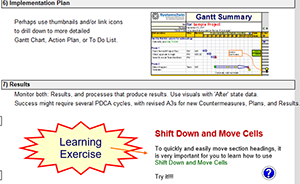
Learning Exercise:
Practice copying this thumbnail to your A3 Report
Where to store archives of A3 Reports
Your company needs to establish your own policies for where to store:
- Paper archives
Final (and key interim) paper documents are fan-folded, and stored in a 3-ring binder in date sequence.
- Electronic archives
With file and folder naming conventions to avoid broken hyperlinks
Save with all other electronic documents related to the same process.
Might also include scanned images of hand-drawn paper documents.
Archive considerations:
- All documents are stored in one accessible place
Paper archives are in a publicly accessible 3-ring binder.
Electronic archives can be socialized, shared, emailed, backed up, and not easily lost
- During the project, save almost everything
Your paper binder will get fat, and your electronic folder will quickly get full, so hopefully you were wise when you set up your file and folder naming conventions.
- After the project, choose which iterations are worth saving for permanent record
It is common to store only the final version publicly – while the author or mentor might privately store some of the iterative versions created along the way.
Go Back to Problem Solving
Suggested Reading and Resources for
A3 Reporting and A3 Management
- Managing to Learn, by John Shook
- Understanding A3 Thinking, by Durward Sobek and Art Smalley
- A3 Problem Solving for Healthcare, by Cindy Jimmerson
- The Kaizen Event Planner, by Karen Martin and Mike Osterling
- Hoshin Kanri for the Lean Enterprise, by Thomas Jackson
Download your
free A3 Report template
Download free trials — which include full working versions of the Word and Excel A3 Report templates (not just a trial)
Own these A3 templates
and all the other
Lean Management tools
to empower every member of your team to apply Lean A3 Thinking everywhere in your organization
Contents
New User Training
Your Systems2win templates come with free New User Training
to quickly learn features that are common to all 150+ templates
Questions?
One huge benefit of owning your Systems2win templates is Support when you need it


Training to get you started.
Tools you won't outgrow.
Similar, familiar tools for
Continuous Improvement
Own Yours Now
Own All 150+ Templates for
Continuous Process Improvement
Training and Coaching
Consider Training and Coaching to support your teams to succeed
Schedule a Conference
Schedule a conference
to discuss your challenges
with an experienced lean advisor
150+ Templates
Try Some
Own Them All
Download Trial Now
Get a dozen trial templates,
and another dozen free gifts
@@@ Better conversion rate
if call to action is for a specific tool, and shows the image
Try It
Try this template
along with a couple dozen more
process improvement tools
Calls to Action Botttom
Related Topics
Related Topics section WITHOUT TESTIMONIALS
Replace this paragraph with menu library item for topics related to this video
Training and Coaching
Consider Training and Coaching to support your teams to succeed
Training to get you started.
Tools you won't outgrow.
Schedule a Conference
Schedule a conference
to discuss your challenges
with an experienced lean advisor