
 Home — Continuous Improvement Tools
Process Improvement Tools.
Standard Work.
Work Instructions.
Flow Chart templates.
Swim Lane Cross Functional Flowchart.
Value Stream Mapping.
Lean tools.
Yamazumi Chart template.
Time Study templates.
DMAIC tools.
Quality Improvement tools.
House of Quality QFD.
FMEA Risk Reduction.
Root Cause Analysis tools.
Problem Solving tools.
OEE.
Preventive Maintenance.
Skip to main content
Installation and Setup
Installation - Each User. Installation - Multi-user. Language Translations. Personalize Your Templates.Systems2win Training.
Quick Start Initial Training. New User Training. Training Matrix. Systems2win Leadership. Training Classes.Lean Training
Lean Training and Coaching. Lean Principles. Muda 8 Wastes. Goal - Lean Flow. Roadmap - Lean Journey. Value Stream Mapping. Standard Work. Hansei Lean Thinking. Lean Dictionary. Online Lean Training. Lean Leadership.Microsoft Office Training
Excel Training. Excel Drawings (without Visio). Excel Charts. Word Training. PDF Training. Document Storage and Naming.Support
Support.Video: Work Instructions template
In this video, you will learn how to use your Work Instructions template (WorkInst.xlsx)
Work Instructions
Topics in this Video
- Why, When, Who, and Where — 0:00
Summary recap of this training online
- Before you begin — 2:00
Have you completed the Quick Start Initial Training?
Have your leaders done their job?
to personalize your master template, and provide one-on-one mentoring
- Orientation — 2:30
How to find help — on the Sample and Help sheets, and on the Work Instructions training web page
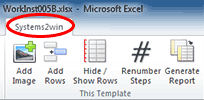
Buttons in the Systems2win menu
This is the only Systems2win template that is not WYSIWYG (what you see is what you get)
- Open a Blank Sheet — 4:00
Systems2win menu > Open a Blank Sheet
New version (released after this video was made):
You have the choice to either:
- Use the advanced features for
Product or Service Familiesthat allow you to maintain your work instructions for an entire Product Family on a single sheet, then click a button to generate sheets for every product in the family... correctly including and excluding Steps that are unique to some products or services within the family
Greatly reducing redundant data entry and mistakes!!!
- Or open a sheet without those advanced features
thereby providing a simpler format for stand-alone processes that don't have variations for different products or services
- Use the advanced features for
- Header fields — 4:10
Hide unused rows (if your leaders haven't already)
For any header cell whose label has an asterisk (*), you will usually enter that header data in the ID Table on the DV sheet (populating every sheet in the workbook with shared data)
Learn more about data tables shared by every sheet in the workbook.
Note: The video shows the shared data table on the VC sheet. The shared data table was later moved to the DV sheet.
- Observe the process — 5:50
using one of your Time Study templates
- Enter your written Work Instructions — 6:10
Images are optional, but every Step must have written Instructions
Start with Major Steps (in bold)
and Key Points (in red)Then flesh out your Instructions, perhaps using colors and fonts for different types of data... such as safety tips, materials and supplies, tools...
For paragraphs, use 'ALT+Enter'
- Options for long instructions
— 7:45
Manually adjust row height DO NOT use Row AutoFit
Use text boxes
Add links to related documents
- Add Image — 9:30
Systems2win menu > Add Image
To make an image bigger, drag the lower right corner, then select the 'Renumber Steps' button
How to view thumbnails of images
How to reduce image file size
You can have unlimited little images and shapes, but only one big image per Step
You can group multiple images and shapes into one big grouped shape.
- Shapes
How to use Excel as a Drawing Tool to add arrows, circles, bursts, text labels, and other shapes.
Home tab > Editing group > Find and Select > Select Objects
- Where to find small shapes
* Standard Excel shapes (Insert > Shapes)
* Systems2win menu > Copy Shapes
* Favorite Shapes (at top of the Work Instructions sheet)
* User-defined shapes - How to Move, Copy, or Delete Rows — 13:40
See video for how to copy or move rows.
Delete shapes before deleting a row.
- Renumber Steps — 14:30
Systems2win menu > Renumber Steps
How to skip sub-steps that shouldn't have a step number
- Add Rows — 15:15
Systems2win menu > Add Rows
for regular rows, and Page Break Header Rows. - Generate Report — 16:30
Systems2win menu > Generate Report
If you don't have product families, simply select the radio button for 'As Is' or 'All Rows'
- Hide/Show Rows — 17:00
Systems2win menu > Hide/Show Rows
If you have Product Families (with products that are similar, but different),
then you will save a lot of time and reduce a lot of errors using the optional Hide/Show Rows feature.
When you select Systems2win menu > Generate Report,
you have radio buttons for: As Is, All Rows, Rows that contain this code, All codes
Related Topics
- Primary training page for Work Instructions
- Training video for how to use your Work Instructions template for Product and Service Families
- More templates and videos for Standard Work
- More Lean Training Templates
Foundational Learning
- Quick Start Initial Training to use ANY Systems2win template
- Training & Support home page
- Video Tips


If you don't yet own a license...
Download Free Trial
Download a dozen free trial
Systems2win templates
Own Yours Now
Own All 150+ Templates for
Continuous Process Improvement


Related Topics